JDBC 공부 및 실습
2025. 9. 30. 17:27ㆍJava
JDBC CRUD 실습 (customer & book 테이블)
이번 실습에서는 madang 스키마 안의 customer, book 테이블을 대상으로 Java JDBC CRUD를 구현했다. 각각 Insert, Update, Delete, Select(단건/전체)를 작성하고, DTO 객체를 통해 데이터를 전달하는 방식으로 구조화했다.
Customer CRUD
package jdbc;

import java.sql.*;
import java.util.ArrayList;
import java.util.List;

public class Test1 {
    static String url = "jdbc:mysql://localhost:3306/madang";
    static String user = "root";
    static String pwd = "root";

    public static void main(String[] args) {
        // INSERT
        // int ret = insertCustomer(6,"손흥민","LAFC","010-1111-1111");

        // UPDATE
        // int ret = updateCustomer(6, "손흥민2", "LAFC2", "010-2222-2222");

        // DELETE
        // int ret = deleteCustomer(6);

        // SELECT 단건
        // CustomerDto dto = detailCustomer(1);
        // System.out.println(dto);

        // SELECT 전체
        List list = listCustomer();
        for(CustomerDto dto : list){
            System.out.println(dto);
        }
    }

    // INSERT
    static int insertCustomer(int custId, String name, String address, String phone) {
        Connection con = null;
        PreparedStatement pstmt = null;
        String sql = "insert into customer values (?, ?, ?, ?)";
        int ret = -1;

        try {
            con = DriverManager.getConnection(url, user, pwd);
            pstmt = con.prepareStatement(sql);
            pstmt.setInt(1, custId);
            pstmt.setString(2, name);
            pstmt.setString(3, address);
            pstmt.setString(4, phone);
            ret = pstmt.executeUpdate();
        } catch(SQLException e) {
            e.printStackTrace();
        } finally {
            try { pstmt.close(); con.close(); } catch(Exception e) {}
        }
        return ret;
    }

    // UPDATE
    static int updateCustomer(int custId, String name, String address, String phone) {
        Connection con = null;
        PreparedStatement pstmt = null;
        String sql = "update customer set name=?, address=?, phone=? where custid=?";
        int ret = -1;

        try {
            con = DriverManager.getConnection(url, user, pwd);
            pstmt = con.prepareStatement(sql);
            pstmt.setString(1, name);
            pstmt.setString(2, address);
            pstmt.setString(3, phone);
            pstmt.setInt(4, custId);
            ret = pstmt.executeUpdate();
        } catch(SQLException e) {
            e.printStackTrace();
        } finally {
            try { pstmt.close(); con.close(); } catch(Exception e) {}
        }
        return ret;
    }

    // DELETE
    static int deleteCustomer(int custId) {
        Connection con = null;
        PreparedStatement pstmt = null;
        String sql = "delete from customer where custid=?";
        int ret = -1;

        try {
            con = DriverManager.getConnection(url, user, pwd);
            pstmt = con.prepareStatement(sql);
            pstmt.setInt(1, custId);
            ret = pstmt.executeUpdate();
        } catch(SQLException e) {
            e.printStackTrace();
        } finally {
            try { pstmt.close(); con.close(); } catch(Exception e) {}
        }
        return ret;
    }

    // SELECT 단건
    static CustomerDto detailCustomer(int custId) {
        Connection con = null;
        PreparedStatement pstmt = null;
        ResultSet rs = null;
        String sql = "select * from customer where custid=?";
        CustomerDto dto = null;

        try {
            con = DriverManager.getConnection(url, user, pwd);
            pstmt = con.prepareStatement(sql);
            pstmt.setInt(1, custId);
            rs = pstmt.executeQuery();

            if(rs.next()) {
                dto = new CustomerDto();
                dto.setCustId(rs.getInt("custid"));
                dto.setName(rs.getString("name"));
                dto.setAddress(rs.getString("address"));
                dto.setPhone(rs.getString("phone"));
            }
        } catch(SQLException e) {
            e.printStackTrace();
        } finally {
            try { rs.close(); pstmt.close(); con.close(); } catch(Exception e) {}
        }
        return dto;
    }

    // SELECT 전체
    static List listCustomer() {
        Connection con = null;
        PreparedStatement pstmt = null;
        ResultSet rs = null;
        String sql = "select custid, name, address, phone from customer";
        List list = new ArrayList<>();

        try {
            con = DriverManager.getConnection(url, user, pwd);
            pstmt = con.prepareStatement(sql);
            rs = pstmt.executeQuery();

            while(rs.next()) {
                CustomerDto dto = new CustomerDto();
                dto.setCustId(rs.getInt("custid"));
                dto.setName(rs.getString("name"));
                dto.setAddress(rs.getString("address"));
                dto.setPhone(rs.getString("phone"));
                list.add(dto);
            }
        } catch(SQLException e) {
            e.printStackTrace();
        } finally {
            try { rs.close(); pstmt.close(); con.close(); } catch(Exception e) {}
        }
        return list;
    }
}
---
Book CRUD
package jdbc;

import java.sql.*;
import java.util.ArrayList;
import java.util.List;

public class BookTest {
    static String url = "jdbc:mysql://localhost:3306/madang";
    static String user = "root";
    static String pwd = "root";

    public static void main(String[] args) {
        // int ret = insertBook(11, "지누의책", "출판사", 1000);
        // int ret = updateBook(11, "지누의책 수정","출판사 수정",2000);
        // int ret = deleteBook(11);

        // BookDto dto = detailBook(1);
        // System.out.println(dto);

        List list = listBook();
        for(BookDto dto : list){
            System.out.println(dto);
        }
    }

    // INSERT
    static int insertBook(int bookid, String bookname, String publisher, int price) {
        Connection con = null;
        PreparedStatement pstmt = null;
        String sql = "insert into book (bookid, bookname, publisher, price) values (?,?,?,?)";
        int ret = -1;

        try {
            con = DriverManager.getConnection(url, user, pwd);
            pstmt = con.prepareStatement(sql);
            pstmt.setInt(1, bookid);
            pstmt.setString(2, bookname);
            pstmt.setString(3, publisher);
            pstmt.setInt(4, price);
            ret = pstmt.executeUpdate();
        } catch(SQLException e) {
            e.printStackTrace();
        } finally {
            try { pstmt.close(); con.close(); } catch(Exception e) {}
        }
        return ret;
    }

    // UPDATE
    static int updateBook(int bookid, String bookname, String publisher, int price) {
        Connection con = null;
        PreparedStatement pstmt = null;
        String sql = "update book set bookname=?, publisher=?, price=? where bookid=?";
        int ret = -1;

        try {
            con = DriverManager.getConnection(url, user, pwd);
            pstmt = con.prepareStatement(sql);
            pstmt.setString(1, bookname);
            pstmt.setString(2, publisher);
            pstmt.setInt(3, price);
            pstmt.setInt(4, bookid);
            ret = pstmt.executeUpdate();
        } catch(SQLException e) {
            e.printStackTrace();
        } finally {
            try { pstmt.close(); con.close(); } catch(Exception e) {}
        }
        return ret;
    }

    // DELETE
    static int deleteBook(int bookid) {
        Connection con = null;
        PreparedStatement pstmt = null;
        String sql = "delete from book where bookid=?";
        int ret = -1;

        try {
            con = DriverManager.getConnection(url, user, pwd);
            pstmt = con.prepareStatement(sql);
            pstmt.setInt(1, bookid);
            ret = pstmt.executeUpdate();
        } catch(SQLException e) {
            e.printStackTrace();
        } finally {
            try { pstmt.close(); con.close(); } catch(Exception e) {}
        }
        return ret;
    }

    // SELECT 단건
    static BookDto detailBook(int bookid) {
        Connection con = null;
        PreparedStatement pstmt = null;
        ResultSet rs = null;
        String sql = "select * from book where bookid=?";
        BookDto dto = null;

        try {
            con = DriverManager.getConnection(url, user, pwd);
            pstmt = con.prepareStatement(sql);
            pstmt.setInt(1, bookid);
            rs = pstmt.executeQuery();

            if(rs.next()) {
                dto = new BookDto();
                dto.setBookid(rs.getInt("bookid"));
                dto.setBookname(rs.getString("bookname"));
                dto.setPublisher(rs.getString("publisher"));
                dto.setPrice(rs.getInt("price"));
            }
        } catch(SQLException e) {
            e.printStackTrace();
        } finally {
            try { rs.close(); pstmt.close(); con.close(); } catch(Exception e) {}
        }
        return dto;
    }

    // SELECT 전체
    static List listBook() {
        Connection con = null;
        PreparedStatement pstmt = null;
        ResultSet rs = null;
        String sql = "select bookid, bookname, publisher, price from book";
        List list = new ArrayList<>();

        try {
            con = DriverManager.getConnection(url, user, pwd);
            pstmt = con.prepareStatement(sql);
            rs = pstmt.executeQuery();

            while(rs.next()) {
                BookDto dto = new BookDto();
                dto.setBookid(rs.getInt("bookid"));
                dto.setBookname(rs.getString("bookname"));
                dto.setPublisher(rs.getString("publisher"));
                dto.setPrice(rs.getInt("price"));
                list.add(dto);
            }
        } catch(SQLException e) {
            e.printStackTrace();
        } finally {
            try { rs.close(); pstmt.close(); con.close(); } catch(Exception e) {}
        }
        return list;
    }
}
---
DTO 클래스 예시
package jdbc;

public class BookDto {
    private int bookid;
    private String bookname;
    private String publisher;
    private int price;

    // Getter & Setter
    public int getBookid() { return bookid; }
    public void setBookid(int bookid) { this.bookid = bookid; }

    public String getBookname() { return bookname; }
    public void setBookname(String bookname) { this.bookname = bookname; }

    public String getPublisher() { return publisher; }
    public void setPublisher(String publisher) { this.publisher = publisher; }

    public int getPrice() { return price; }
    public void setPrice(int price) { this.price = price; }

    @Override
    public String toString() {
        return "BookDto{" +
                "bookid=" + bookid +
                ", bookname='" + bookname + '\'' +
                ", publisher='" + publisher + '\'' +
                ", price=" + price +
                '}';
    }
}
---
Eclipse 단축키 정리
- Getter / Setter 자동 생성 :
Alt + Shift + S → R - toString() 자동 생성 :
Alt + Shift + S → S - equals() / hashCode() :
Alt + Shift + S → H - 생성자(Constructor) 자동 생성 :
Alt + Shift + S → O
JDBC 개요
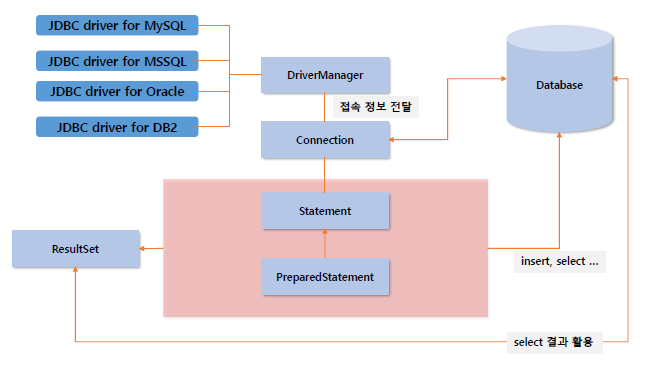
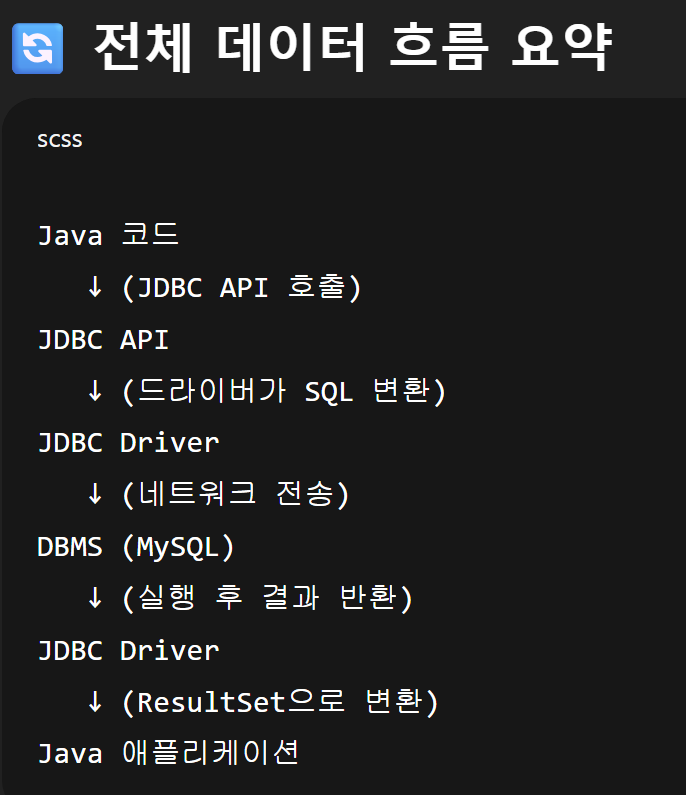
JDBC (Java Database Connectivity)는 자바에서 데이터베이스와 연결하여 SQL을 실행할 수 있도록 해주는 표준 API이다.
- JDBC는 데이터베이스 벤더(Oracle, MySQL 등)와 독립적인 공통 인터페이스 제공
- 드라이버(Driver)를 통해 DBMS와 통신
- 자바 프로그램에서 SQL 실행 및 결과(ResultSet) 처리 가능
JDBC의 주요 동작 흐름은 다음과 같다:
- 드라이버 로드 : MySQL의 경우
com.mysql.cj.jdbc.Driver - DB 연결 :
DriverManager.getConnection() - SQL 실행 :
Statement또는PreparedStatement - 결과 처리 :
ResultSet - 리소스 해제 :
close()
📦 java.sql 패키지 주요 클래스
- DriverManager : 데이터베이스 연결 관리 (
getConnection()) - Connection : DB와 연결된 세션 (트랜잭션 관리 포함)
- Statement : SQL 실행 객체 (정적 SQL에 사용)
- PreparedStatement : ? 파라미터 바인딩 가능, 보안/성능 유리
- ResultSet : SELECT 결과 집합을 행 단위로 읽는 객체
- SQLException : DB 작업 중 발생하는 예외 처리
📖 정리
- DTO는 Data Transfer Object, 데이터를 담아 전달하기 위한 객체
- CRUD 구현 시
PreparedStatement를 사용해 SQL 실행 ResultSet→ DTO 변환 후 반환- 단건 조회는
BookDto, 전체 조회는List<BookDto>반환 - 리소스 정리는
finally블록에서 close()
'Java' 카테고리의 다른 글
| [LG U+ 유레카 3기] DTO vs Entity 차이점 정리 및 이해 (0) | 2025.10.20 |
|---|